Tuesday, May 3, 2022

iCE40 FPGA Tinkering

After my very short experience with getting the Vivado toolchain setup to use the the Pynq FPGA board a few years ago, I've decided to get back into doing some projects with a FPGA again. I only ever got around to blinking an LED before putting the board aside; I had no solid projects in mind to make. The only reason I tried using it was that I was able to get one for free and it is the board used in the digital design class at Berkeley. I know it is a very powerful device and has lots of nice peripherals directly on the board so I may come back to it in the future. (Most digital design time is really spent in simulation anyways so the exact hardware doesn't matter that much.)

But man, the complete Vivado toolchain is nearly 80GB installed, and the bloat of everything with respect to it did not sit nicely with me. So recently I set out to find a different FPGA with a nicer ecosystem. From other projects I've seen online the first one I looked into and eventually settled on was the Lattice series of iCE40 FPGAs. The configuration bitstream has been reverse-engineered and a series of open-source tools have been developed for using these iCE parts. Synthesis, place-and-route, and bitstream generation all can be done through some simple steps. (Most other FPGAs still have locked down bitstreams and is why you need to use vendor-specific tools to do the synthesis and place-and-route. Being tools that are developed by large corporations with lots of money, they may/probably have better outputs from these steps (e.g. more optimized synthesis, better place-and-route of logic cells for better timing, etc.).)

I picked up a UPduino board with its iCE40-UP5K FPGA and installed the APIO ecosystem for the development and build toolchain. APIO makes it super convenient to develop for these FPGAs as it bundles together all of the open source tools.

General setup process (so I don't forget it; recently I had to re-lookup how I setup my STM32 toolchain back in 2018 so if I wanted to use them for a real project I would be able to):

  1. Install APIO
  2. Generally followed this guide.
  3. Initialize project with apio init --board iCE40-UP5K -s
    1. -s allows us to customize the SConstruct file so that we can the build process look into subdirectories for the source files.
  4. For simulation use apio sim
    1. Simulates from *_tb.v files
  5. apio build to build the verilog
  6. For some reason apio upload would not work for me; I suspect there is a PATH problem with my python setup (error: 'WindowsPath' object is not iterable)
    1. I just manually uploaded with iceprog -I A [path to bitstream]
Within minutes I had some blinky LEDs going current controlled by the internal LED peripheral, and running a simulation was relatively straightforward. Next steps are generating PWM and then maybe generating some VGA signals. Still not sure if this the best platform to be using but for small projects the simplicity is nice.

Aside: Some time ago I had did about a day's worth of tinkering with Verilog and getting simulation setup with iverilog and gtkwave after reading blog posts on zipcpu and gaining some interest in HDL again. Getting everything setup on Windows is slightly annoying with all the random things on my path and multiple terminal and shells installed over the years (got the windows CMD, git bash with mingw, msys2, and cygwin).

Tuesday, January 4, 2022

Switching Buck Regulator: from theory, through simulation, to implementation

I had a much longer introduction written up in my draft document of this but now looking back at it, it's a little unnecessary. To summarize my thoughts; in an attempt to provide some motivating direct applications of what I have learned in classes, I want to begin writing about some projects that directly apply the theory from class to something more tangible. Hopefully they can demonstrate real-world issues that one can run into when implementing these concepts for real. This is also a good excuse for me to refresh my memory on many of these topics and provide a good written reference to hold on to.

Any errors/things that are unclear are on me. Hopefully there aren't too many and I'm not saying anything too wrong. 🤷‍♂️

Part 1: Basic Buck Converter Theory 

This is a quick crash course of DC-DC switching buck converters using my knowledge from EE113, Power Electronics, and EE128C, Feedback Control Systems. In my power electronics class, we went over the basics of the most common types of power converters. Hopefully this is a good refresher for me and lets me put theory into practice. [This write up is really mainly for me and kinda but doesn't really begin from the very basics; it also tries to follow a linear progression to the best of my abilities but there many subtopics that loop back on themselves.]

In this design example I want to go through the basics of a buck converter again and then apply some feedback/controls knowledge to making a converter that can deliver a set output for a varying range of inputs. This will also allow us to look at the transient response of the output of the regulator, from startup and changes on the input, to sudden changes to the output load. Everything I write will be from what I remember from EE113/my notes/the textbook Fundamentals of Power Electronics by Robert Erickson. I didn’t look at the textbook that much during class, but as I now reference it for this project it reads very clearly and is an excellent reference.  If anything is unclear here, definitely take a look at that book.

Saturday, January 1, 2022

Photos of 2021

Nothing technical about this post; just a recap of some photos I took throughout 2021 that I liked.

Sunrise

Mt. Tallac

Morning

IMG04947

IMG09698

IMG00431

Comments: The forest one I like but feel the background should have either been more blurred (would have need a bigger aperture than the f/4 I had) or more in focus; currently it feels half-done both ways and is just a bit mushy. The Christmas one should probably be cropped tighter; the edges are messy. I should have framed the last one a little lower and wish the clouds were a little more dramatic.

I've also been going through some old photos and uploading/backdating a few I like.

Sunday, September 19, 2021

CAD Practice: Stress/Modal Simulation

This weekend I wanted to explore the simulation options within Fusion 360 since I had never used them before. I decided to take the layout from a previous class HW question since I already had the model in Fusion.

Folded-flexure comb drive resonator.

Above is a folded-flexure comb drive MEMS resonator, although modeled in Fusion in millimeters instead of microns. It's a very well studied design, where the resonance frequency is mainly determined by the shuttle mass and the spring constants of the folded-flexure. I though this would be a good test since I know the equations for the spring constants of these beams and have done the analysis for these devices before.

How these devices normally work is that the center moving mass is set to a certain DC voltage, and then an AC signal is applied to one of the side combs. When the AC signal's frequency matches the resonance frequency of the center mass, the center mass will begin to oscillate significantly and the teeth in the combs will slide past each other, causing a change in capacitance at the other side (the output port). The change in capacitance will induce a current at the output comb that can be sensed, and it will have maximum amplitude at the resonant frequency.

Saturday, September 4, 2021

CAD Practice: Pencil Cup

Continuing with last weekend's practice, I modeled a slightly easier object for today: a pencil holder cup. 

Orthographic 3/4 view.

Orthographic side view.


It's effectively a cylinder so my main method of building this was with revolved profiles and circular patterns. The top and bottom lips were created as 2D profiles at the right radius away, and then revolved about the vertical axis. Nothing too special for these.

Sunday, August 29, 2021

CAD Practice: Glasses

It's been awhile since I've done any real personal design work, especially CAD work. I've never been that great at using CAD and have looked into "optimal" practices when drawing something up in the computer on and off over the years. Some examples of questions I've had are like what order should different bodies be created; when should we fillet on the sketch first or after the extrusion on the edge, how to create effective "dynamic" designs that change with parameters, the best way of creating either movable or rigid joints between objects, good flows for large multi-part assemblies, etc. There are always more questions the more I see other designs online and the more I personally design.

I've definitely picked up tips along the way like using boolean intersection and cuts more often (e.g. for making tabs), using a dog-bone plugin for modifying sharp internal corners for CNCing, and other more general workflow optimizations. But in the end, just CAD'ing more is the best practice for being faster and identifying poor workflow; if possible, manufacturing the design after CAD is even better as you quickly learn what is and isn't possible to make with your tooling (my time with my crappy CNC has taught me a ton).

But back to just CAD'ing more; I had some free time recently and decided I should try to CAD my glasses for some practice. Using only a simple ruler for some basic measurements (so I was designing near the right order of magnitude) and the judicious freedom of my eyeballs, I whipped up this model:

Orthographic 3/4 view.
Perspective front view.

Perspective top view.
 

I modeled half of the glasses and then mirrored everything at the end for the other half. I started off with the lenses. I created them by creating a spline for the front facing outline of the lens, then created a series of arcs and lines for the top down outline of the lens. I extruded both profiles, and used a boolean intersection to get the final lens. For the groove around the edge of the lens that holds the wire holding the lens to the frame, I sketched a groove into one side of the lens, then lofted the profile as a cut all the way around.

Monday, July 20, 2020

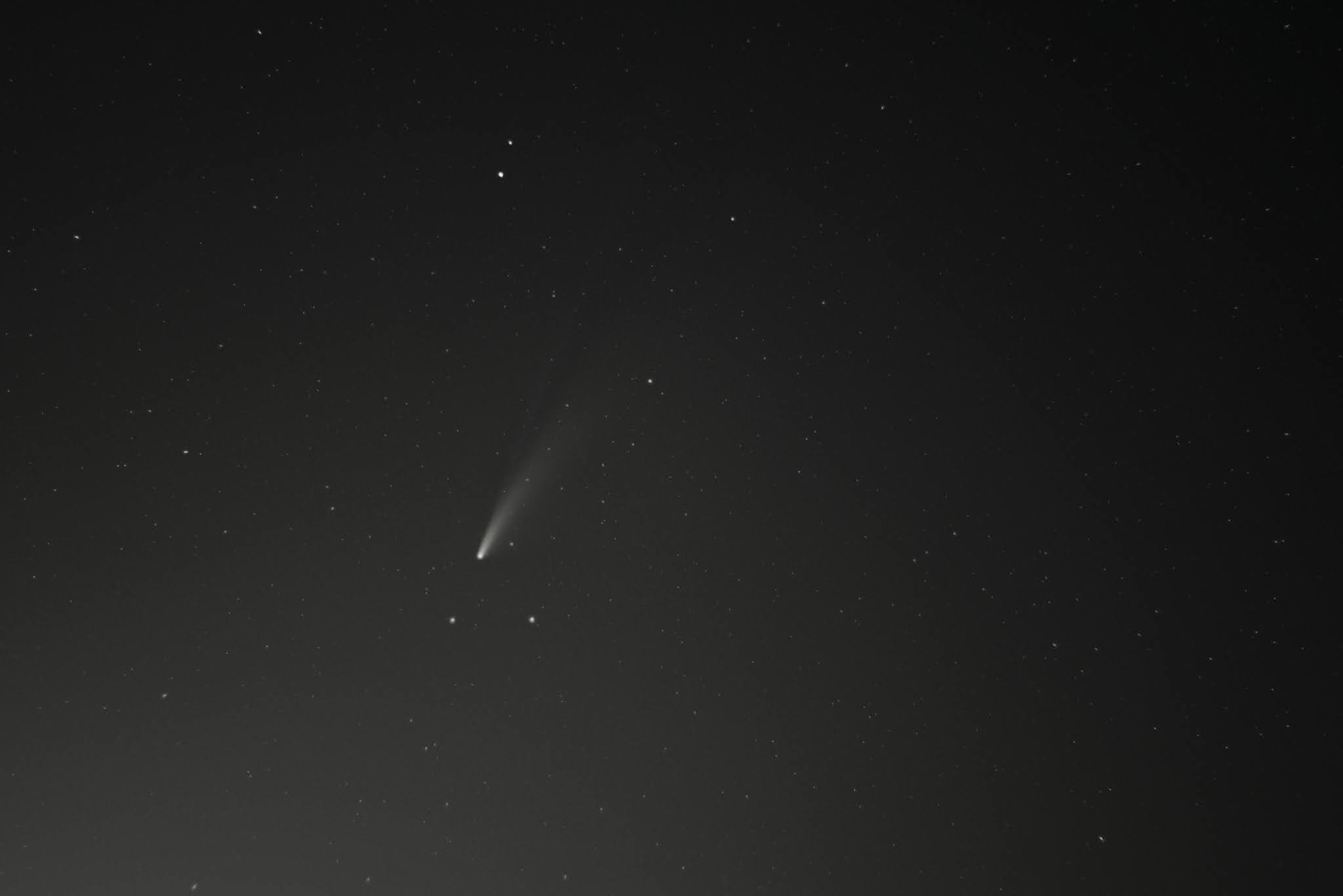
Comet C/2020 Astrophotography

Last weekend I went out to take some photos of the comet C/2020 F3 NEOWISE, which is has been passing by for the last several days and will still be in sight for a few more days. I wasn't able to go too far to get to a dark place so the light pollution was pretty bad. Not the most detail in the photos but some stacking and light pollution gradient removal worked pretty well.

I haven't done astrophotography for awhile so I was a little rusty, but still got some nice shots:

135mm, f/5.6, 2 seconds, 80 lights stacked in DSS, gradient removed in PS.

50mm, f/1.8, ISO 800, 4 seconds, 55 lights stacked in DSS, gradient removed in PS.
Panorama.